CentOS7安装docker、镜像源问题

CentOS7 镜像源问题

使用centos-valut镜像【推荐】

valut有保险的意思,旧版本都会归到这个镜像源中,这里推荐阿里`和华为的镜像源,示例以华为镜像源演示(不为别的,就为下载快!)

华为centos-valut镜像源:https://mirrors.huaweicloud.com/centos-vault/

1
2
3
4
5
6
7
8
#备份
mkdir /etc/yum.repo.d/bak
mv /etc/yum.repo.d/*.repo /etc/yum.repo.d/bak/
#下载镜像源配置
curl -o /etc/yum.repos.d/CentOS-Base.repo https://mirrors.huaweicloud.com/artifactory/os-conf/centos/centos-7.repo
#更新yum缓存,验证安装
yum clean all && yum makecache
yum install -y vim
1
2
3
4
5
6
7
8
9
10
11
12
13
14
15
16
17
18
19
20
21
22
23
24
25
26
27
28
29
30
31
32
33
34
35
36
37
38
39
40
41
42
43
44
# CentOS-Base.repo
#
# The mirror system uses the connecting IP address of the client and the
# update status of each mirror to pick mirrors that are updated to and
# geographically close to the client. You should use this for CentOS updates
# unless you are manually picking other mirrors.
#
# If the mirrorlist= does not work for you, as a fall back you can try the
# remarked out baseurl= line instead.
#
#

[base]
name=CentOS-$releasever - Base - repo.huaweicloud.com
baseurl=https://repo.huaweicloud.com/centos-vault/7.9.2009/os/$basearch/
#mirrorlist=https://mirrorlist.centos.org/?release=$releasever&arch=$basearch&repo=os
gpgcheck=1
gpgkey=https://repo.huaweicloud.com/centos-vault/RPM-GPG-KEY-CentOS-7

#released updates
[updates]
name=CentOS-$releasever - Updates - repo.huaweicloud.com
baseurl=https://repo.huaweicloud.com/centos-vault/7.9.2009/updates/$basearch/
#mirrorlist=https://mirrorlist.centos.org/?release=$releasever&arch=$basearch&repo=updates
gpgcheck=1
gpgkey=https://repo.huaweicloud.com/centos-vault/RPM-GPG-KEY-CentOS-7

#additional packages that may be useful
[extras]
name=CentOS-$releasever - Extras - repo.huaweicloud.com
baseurl=https://repo.huaweicloud.com/centos-vault/7.9.2009/extras/$basearch/
#mirrorlist=https://mirrorlist.centos.org/?release=$releasever&arch=$basearch&repo=extras
gpgcheck=1
gpgkey=https://repo.huaweicloud.com/centos-vault/RPM-GPG-KEY-CentOS-7

#additional packages that extend functionality of existing packages
[centosplus]
name=CentOS-$releasever - Plus - repo.huaweicloud.com
baseurl=https://repo.huaweicloud.com/centos-vault/7.9.2009/centosplus/$basearch/
#mirrorlist=https://mirrorlist.centos.org/?release=$releasever&arch=$basearch&repo=centosplus
gpgcheck=1
enabled=0
gpgkey=https://repo.huaweicloud.com/centos-vault/RPM-GPG-KEY-CentOS-7

阿里镜像源

阿里镜像源地址:https://mirrors.aliyun.com/centos/7.9.2009/

1
2
3
4
5
6
7
8
#备份
mkdir /etc/yum.repo.d/bak
mv /etc/yum.repo.d/*.repo /etc/yum.repo.d/bak/
#下载镜像源配置
curl -o /etc/yum.repos.d/CentOS-Base.repo https://mirrors.aliyun.com/repo/Centos-7.repo
#更新yum缓存,验证安装
yum clean all && yum makecache
yum install -y vim

本地搭建镜像源

作为内网环境使用yum源的方法备用。
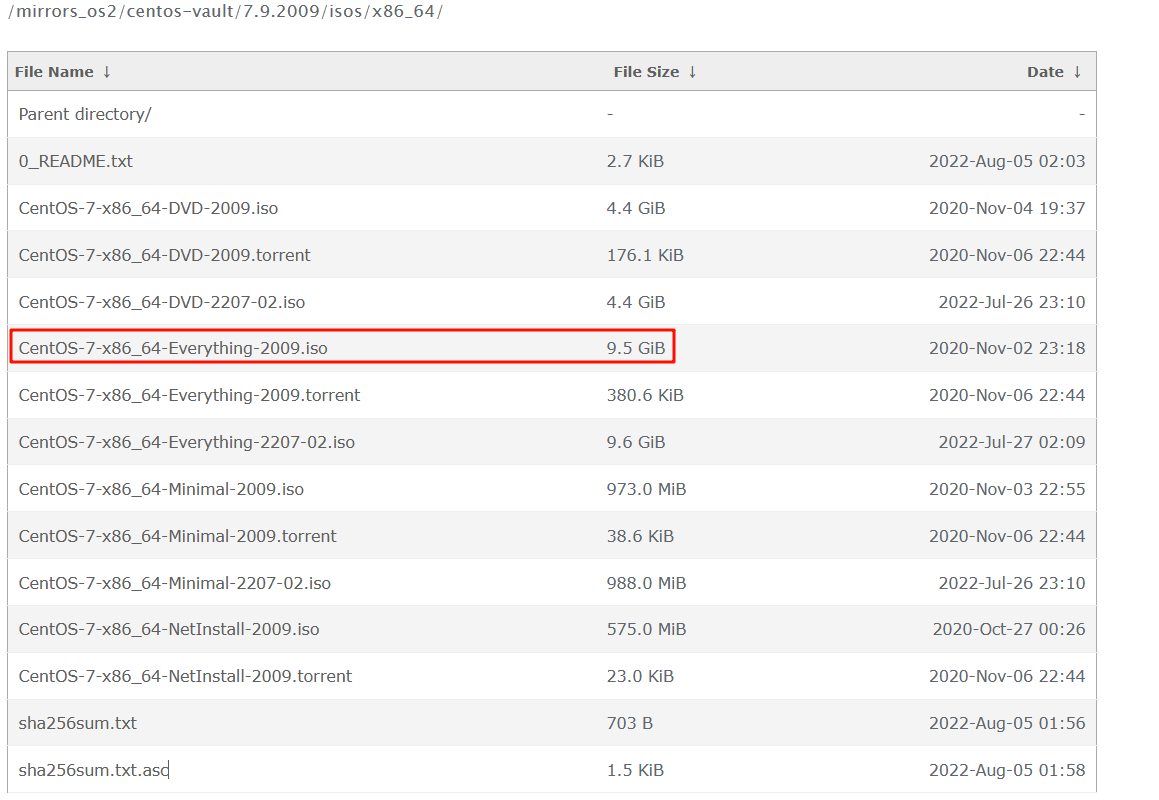
1、下载centos7 ISO镜像,下载地址 https://mirrors.huaweicloud.com/centos-vault/7.9.2009/isos/x86_64/ ,推荐选择Everything版本。

img

2、上传镜像到服务器,以/root目录举例
3、root用户执行命令挂载创建本地镜像源,镜像源目录以/mnt/repo举例

1
2
3
4
5
6
7
8
9
10
11
12
13
14
15
16
17
18
19
20
21
#备份
mkdir /etc/yum.repo.d/bak
mv /etc/yum.repo.d/*.repo /etc/yum.repo.d/bak/
cp /etc/fstab /etc/fstab.bak
#创建挂载目标目录
mkdir /mnt/repo
#临时挂载,ISO只能只读挂载
mount -o loop /root/CentOS-7-x86_64-Everything-2009.iso /mnt/repo
#创建本地镜像源配置
cat > /etc/yum.repo.d/local.repo<<EOF
[centos-test]
name=centos-test
baseurl=file:///mnt/repo
enable=1
gpgcheck=0
EOF
#更新yum缓存,验证安装
yum clean all && yum makecache
yum install -y vim
#开机自动挂载
echo "/root/CentOS-7-x86_64-Everything-2009.iso /mnt/repo iso9660 loop,defaults 0 0" >> /etc/fstab

https://www.cnblogs.com/hellxz/p/18840267

Docker 仓库

1
sudo wget -O /etc/yum.repos.d/docker-ce.repo http://mirrors.aliyun.com/docker-ce/linux/centos/docker-ce.repo
1
2
3
4
5
6
7
8
9
10
11
12
13
14
15
16
17
18
[root@localhost yum.repos.d]# sudo wget -O /etc/yum.repos.d/docker-ce.repo http://mirrors.aliyun.com/docker-ce/linux/centos/docker-ce.repo
--2025-04-27 10:13:04-- http://mirrors.aliyun.com/docker-ce/linux/centos/docker-ce.repo
正在解析主机 mirrors.aliyun.com (mirrors.aliyun.com)... 155.102.4.144, 155.102.4.143, 155.102.4.146, ...
正在连接 mirrors.aliyun.com (mirrors.aliyun.com)|155.102.4.144|:80... 已连接。
已发出 HTTP 请求,正在等待回应... 200 OK
长度:2081 (2.0K) [application/octet-stream]
正在保存至: “/etc/yum.repos.d/docker-ce.repo”

100%[==============================================================================>] 2,081 --.-K/s 用时 0s

2025-04-27 10:13:06 (20.7 MB/s) - 已保存 “/etc/yum.repos.d/docker-ce.repo” [2081/2081])

[root@localhost yum.repos.d]# ll
总用量 8
-rw-r--r--. 1 root root 1811 4月 27 09:55 CentOS-Base.repo
-rw-r--r--. 1 root root 2081 4月 27 10:13 docker-ce.repo
[root@localhost yum.repos.d]# sudo yum install -y docker-ce docker-ce-cli containerd.io

